
Gift of the Gab: Handy Insights into UX Writing
Gift of the Gab: Handy Insights into UX Writing Read about UX writing as a tool supporting UI design and improving user engagement in web and mobile products. Check tips for powerful microcopy.
During the recent couple of years, the digital design community has been discussing a brand new trend called UX writing. The term appeared suddenly confusing many people, even some design professionals. Some think it’s a new name for UX design, others see it as copywriting related to the UX topic. In this article, we’ll figure out the meaning of UX writing and why the tech world talks so much about it. Also, we’ll provide some practical tips on effective UX writing.
What’s UX writing?
The term may be new but the process has existed for a long time. UX writing is the practice of crafting copy which is directly used in user interfaces to guide users within a product and help them interact with it. The major aim of UX writing is to settle communication between users and a digital product.
Copy created by UX writers is also known as microcopy. The name tells for itself and stands for the small components of text which serve as hints for users. To be more specific, microcopy includes buttons and menu copy, error messages, security notes, terms and conditions, as well as any kind of instructions on product usage.

Why is UX writing needed?
Microcopy has always been a part of digital products, so why have people started calling the process of creating it UX writing? Let’s get it straight.
One of the first reasons for the emergence of UX writing is the growing attention to the role of copy in UI. Marketing and design specialists have agreed that copy content is a significant element influencing both UI and UX. Badly written copy can ruin even a really good-looking user interface. As for the microcopy, various user tests have shown that it affects user experience as well as the information architecture and navigation system.
If we look at a product from the users’ perspective, we’ll see how useful small copy hints are for them. When people start their journey with new software, short text tips make the adaptation process fast and easy. Moreover, if the menu copy is written professionally, the navigation system is much clearer to use.
Considering the positive impact of microcopy on user experience, a new direction appeared in copywriting. At this point, we can expand on the essence of UX writing to say that it’s a process of crafting microcopy elements that aim to improve the user experience of a website or app.

Vintage Car App Onboarding
Who has to do UX writing?
We defined the essence of UX writing, but one question remains open. Whose duty is it?
The direction couldn’t be formed by itself, so, obviously, there are specialists standing behind it. The job of a UX writer grows its potential, and today we can see more and more offers from companies. They are writers specializing in creating microcopy to enhance a pleasant user experience and improve navigation systems.
UX writing is still a green direction, which is why the task of microcopy creation often falls upon marketers and copywriters. These professionals have been writing microcopy long before a term of UX writing appeared and they continue doing it as one of the parts of their work.
However, it’s not only writers who can create UX copy. Designers also often try themselves in UX writing. They may not be specialists in copy creation still they know everything about the information architecture and navigation system of a product. Moreover, UI/UX designers research the target audience’s peculiarities, so they know how to present visual information for user perception.
Copywriters and designers can do UX writing separately, but to improve the outcome, it’s always a good idea to collaborate and share the experience. Together, IA professionals, designers, and copywriters can successfully create UX copy content, and this is how it is often done by many companies today. However, if a company handles many projects that involve much of UX writing, it is reasonable to consider hiring a UX writer to gain maximum productivity for the entire team.
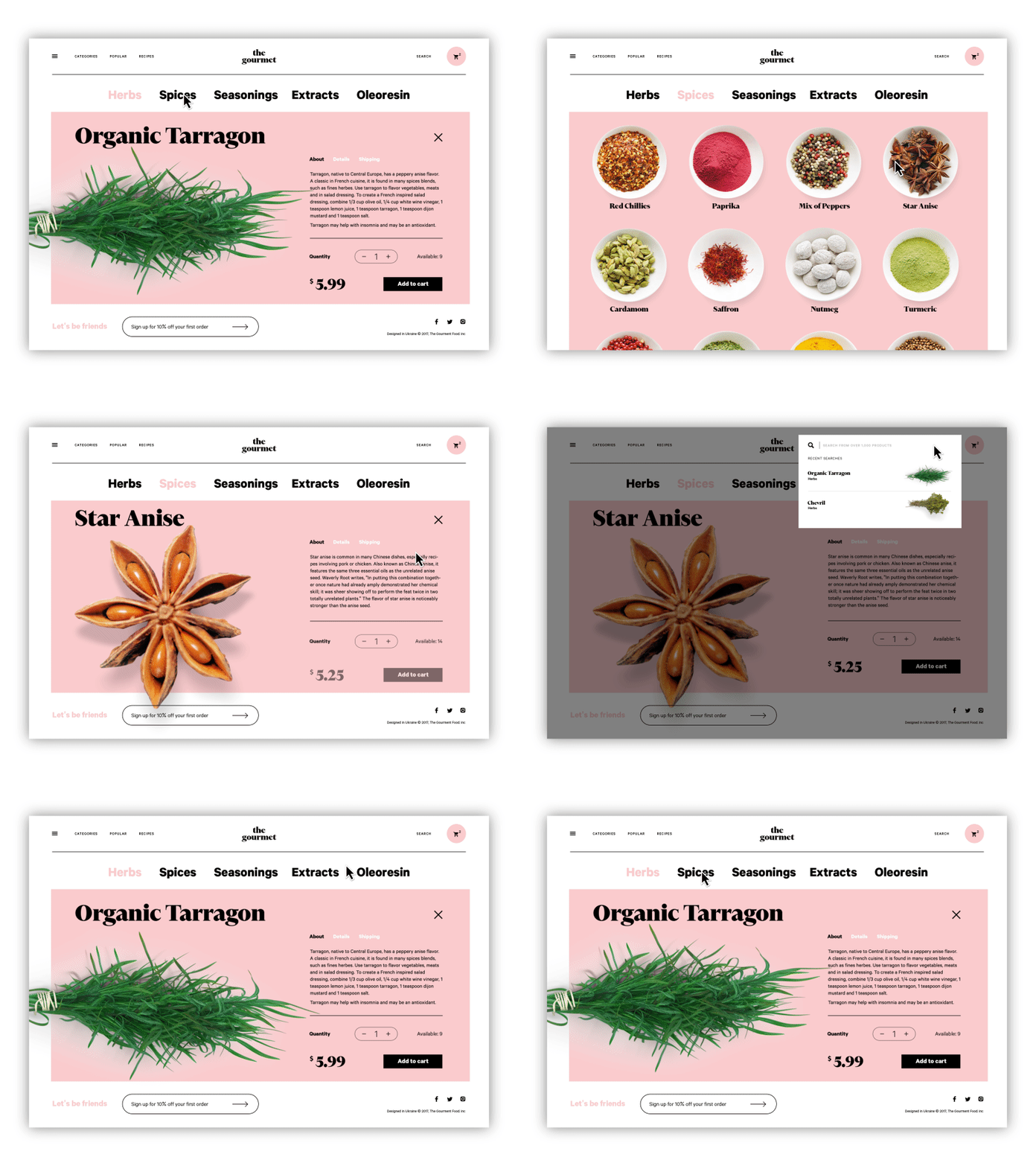
The Gourmet Website
What makes efficient UX writing
Some may think that UX writing takes only a few minutes to complete, since it involves only small pieces of text. However, creating a powerful CTA button phrase can sometimes take much more time and effort than writing a whole body copy.
Microcopy usually can vary from one word to short sentences, which should perform numerous functions. So, if we say that in UX writing every word counts, it won’t be hyperbole. A single word should both help users to get oriented and encourage them to stick around. Moreover, there is often a business goal standing behind CTA buttons, so this factor should also be considered during UX writing.
The sufficient UX copy needs to be clear and consistent. Users don’t have to figure out what you mean. The copy should be simple so people can interact with the product intuitively. If users don’t notice they’ve been guided, UX writing has been done well. In addition, UX writing, like any other copy, should be tailored to the context and target audience.
In addition, we need to say that copy is a design element the reason why its effectiveness highly depends on the visual presentation. UX writers need to make sure it looks good and fits the design composition. Such a condition creates constraints for a writer about the amount of copy and its appearance.

Digital Agency Landing Page
Practical tips on UX writing
The experts are still developing the direction to define the best techniques and methods for effective UX writing. However, there are some sufficient tips helping to make sure the UX copy will work well.
Step into users’ shoes. To create useful copy, you need to understand where users need help. User research helps to learn the target audience and know their specialties, you can assume what hints people need.
Don’t use complicated vocabulary. As we said above, one of the major characteristics of effective UX writing is clarity and simplicity. Copy should be easy to perceive that’s why difficult words may not work well.
Write short and then cut it in half. Microcopy received its name, not by coincidence. It has to be short but meaningful, so it won’t draw too much attention, only slightly guiding people from one point to another.
Test the copy on various users. You can be a guru of writing and UX design, but user testing never hurts. If you don’t have anyone who would match the target audience, at least test copy on your co-workers or friends and ask them what they feel about it.
Be creative. Microcopy typically includes only short informative messages but it doesn’t mean you have to make it boring. Try to be creative and bring some positive emotions. For example, writing an error message you can use some polite jokes. It breaks the tension that may appear if users do something wrong and encourages them to stick around. Just remember to make sure your creativity doesn’t go too far and the target audience will react appropriately.
Add images. In case of error messages or onboarding instructions, it can be a good idea to supplement them with funny and pretty images. You can use photos as well as custom illustrations which will strengthen the right message of a copy.
Reflect brand voice. Don’t forget that the instructions that a product gives to users are always perceived as the voice of the brand. So, before you write copy, you need to learn about the brand’s nature so that microcopy would sound in accordance with the brand image.

Books for Children Website
UX writing is a new direction with significant potential. UX professionals need to consider it another essential tool on the path to improved user interaction and increased product satisfaction.
Recommended reading
How to Make a Web Interface Readable
UX Writing: Handy Tips on Text Improving User Experience
Copywriting for Mobile and Web Interfaces: Types of UI Copy
The Role of Copywriting in UI Design
Error Screens and Messages: UX Design Practices
5 Basic Types of Images in Web Design
The Anatomy of a Web Page: Basic Elements
Web Design: 17 Basic Types of Web Pages
Originally written for Tubik Blog
 https://design4users.com/insights-into-ux-writing/
2026-01-18
© by
Marina Yalanska
,
https://design4users.com/insights-into-ux-writing/
2026-01-18
© by
Marina Yalanska
,
- English
- Ukrainian